


 Experience the power of optimization!
Ready to unleash the full potential of your Windows system? WinTools.net is your ultimate weapon! Say goodbye to sluggish performance and hello to blazing speed. Take control of your startup process, monitor memory like a pro, and customize your desktop and system settings to perfection. Boost your connection speed and stability, ensure your privacy, and keep your sensitive information secure. WinTools.net is not just a suite of tools; it's your key to a faster, more efficient, and secure Windows experience.



Copyright © 2002-2026
WinTools.net by Ruslan Smekalov, All rights reserved.
The File Shredder tool is designed for the secure deletion of documents, programs, and other files, making it impossible to restore them. When files are deleted on a computer, the file itself is not entirely removed - only a portion of its header is deleted. The rest of the information from the file remains on the hard drive, giving the impression that it has been deleted. However, there are specialized programs that can recover these seemingly erased files. If you delete sensitive files using conventional methods or the “Recycle Bin” procedure, these files can still be restored without difficulty by unauthorized individuals or special agencies.
The File Shredder tool enhances the deletion process by erasing the information within the file itself, renaming it to prevent access to the file name, and then deleting it in the usual manner. After this type of deletion, it becomes impossible to determine the original name of the file. Moreover, if this file is somehow restored, it will not contain the original information but rather nonsensical data.
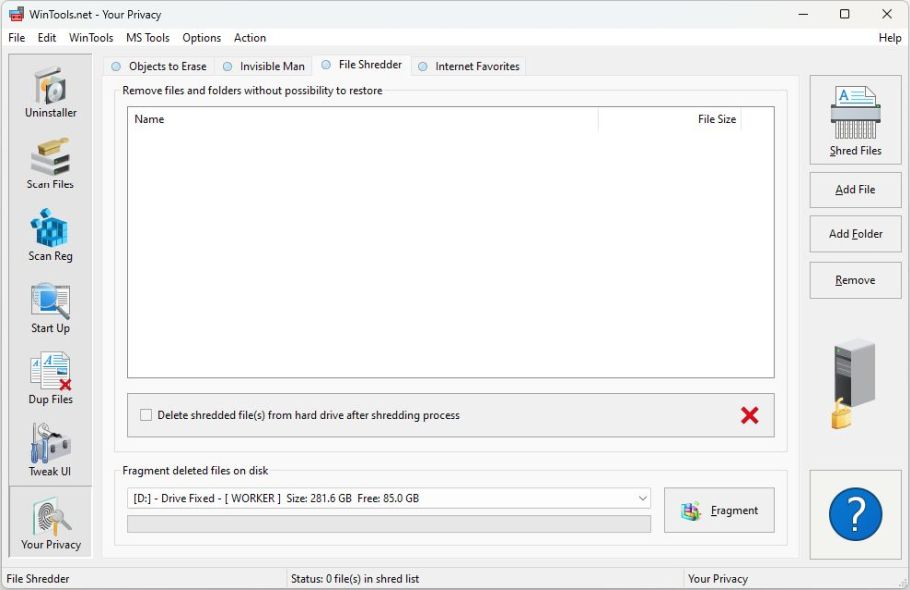
To delete files without the possibility of restoration, you first need to place the files you want to delete in the “Shred” list. You can add files individually using the “Load File” button or add all files from a folder using the “Load Folder” button. Please note that when you load files from a folder, all files from its subfolders will also be placed in the “Shred” list. You can modify the “Shred” list using the “Remove” button, which removes all files from the list. By pressing the “Shred Files” button, the irreversible deletion process for files placed in the “Shred” list will commence. This ensures your digital privacy and the security of your sensitive information.